Hen House
Need a little more room in your Garden? The Hen House stores your Wildlife Eggs so you can keep them for later and free up space for merging. 🐣🌿
🐣 What is the Hen House?
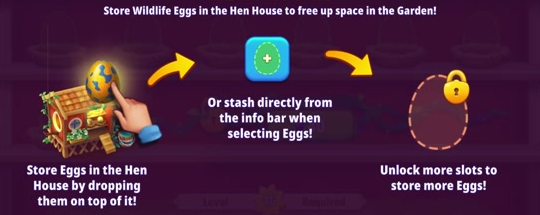
The Hen House is Egg storage in your Home Garden. Place Eggs inside to clear their spaces in the Garden, then bring them back when you're ready to use them.
🔓 How do I unlock it?
The Hen House becomes available at level 8.
🥚 How do I store Eggs?
You can store Eggs in the way that suits you:
Drag an Egg from your Garden and drop it onto the Hen House.
Select an Egg and tap the storage button in its info bar.
Open the Hen House and tap Auto Add to move Eggs from your Garden into available storage spaces.
Auto Add needs Eggs in your Garden and room in the Hen House. If you see “No Eggs in the Garden!”, there are no Eggs available for it to collect.
🏡 How do the Free and Premium spaces work?
You can unlock 1 Premium rows in the Hen House. The remaining rows become available according to your level in the game.
Scroll down to see the remaining rows and the game level required to unlock them.
Premium spaces can be unlocked with Gems. Tap the available Unlock button and review the in-game cost before confirming.
Unlock the available Premium section before moving on to the next locked section.
You can keep using your available Free spaces without unlocking Premium spaces.
↩ How do I return Eggs to my Garden?
Open the Hen House and tap a stored Egg to return it to your Garden. To take stored Eggs out together, use the All button with the minus symbol.
Make sure there is empty land in your Garden before removing Eggs. If the Garden is full, clear some space and try again.
💡 What if the Hen House is full?
Return stored Eggs to the Garden to free up storage, or check whether more shelf space or a Premium unlock is available. A full Hen House cannot accept more Eggs until you make room.
You can also open Wildlife Collection from the Hen House to check your Wildlife.
For a reminder of the storage controls, tap the question mark in the Hen House.